Day 03 - 06

Computer Engineering major, Clean Energy evangelist, Machine Learning Enthusiast, ALX drilled Software Engineer, Google certified Data Analyst. A tech Generalist.
30 Days of Machine Learning & AI : Days 3–6
From Raw Weather Data to Machine Learning Features
After spending the first two days building the project's foundation—connecting to the Open-Meteo API and designing a PostgreSQL-backed ingestion pipeline—it was finally time to prepare the data for machine learning.
A common misconception is that machine learning starts with choosing an algorithm. In reality, most of the engineering effort happens before any model is trained.
Over the past four days, I focused entirely on transforming raw weather observations into a dataset that a machine learning model can actually understand.
The Project Structure So Far
Here's what was added during Days 3–6.
30_days_of_ML_AI/
└── ml-sprint/
    ├── data/
    │   ├── raw/
    │   ├── processed/          ← Added
    │   └── splits/             ← Added
    ├── ingestion/
    │   ├── api_client.py
    │   └── db.py
    ├── notebooks/
    │   └── 01_data_preparation.ipynb   ← Added
    ├── models/
    │   └── scaler.joblib       ← Generated on Day 6
    ├── config.py
    ├── requirements.txt
    └── .env
As we progress from day one to day six of the project we added some new files to our file strucutre which resding to the end will justify the why's. lets dive in
Day 3 — Cleaning the Dataset
The first step before any analysis was ensuring the weather data was actually usable.
Some of the tasks included:
checking missing values
validating timestamps
removing duplicate observations
confirming data types
identifying sensor anomalies
One thing learned on the day threes is the act of making data trustworthy**.**
Before moving forward, the data timestamp column was converted into the DataFrame index.
df["timestamp"] = pd.to_datetime(df["timestamp"])
df = df.sort_values("timestamp")
Although this is only two lines of code, it unlocks one of Pandas' most powerful capabilities: time-series operations.
Without this step, resampling, rolling windows, and lag features become which will be used later will be much harder.
Day 4 — Exploratory Data Analysis (EDA)
The next question after making the data trustworthy became:
What story is this dataset trying to tell?
Rather than staring at tables of numbers, the data were visualized to study the weather pattern.
Daily Weather Trends
The first visualization looked at daily averages.
daily = df.set_index("timestamp").resample("D").mean(numeric_only=True)
From this single resampling operation, six different visualizations was generated to show:
Temperature
Solar Radiation
Wind Speed
Relative Humidity
Rainfall
Cloud Cover
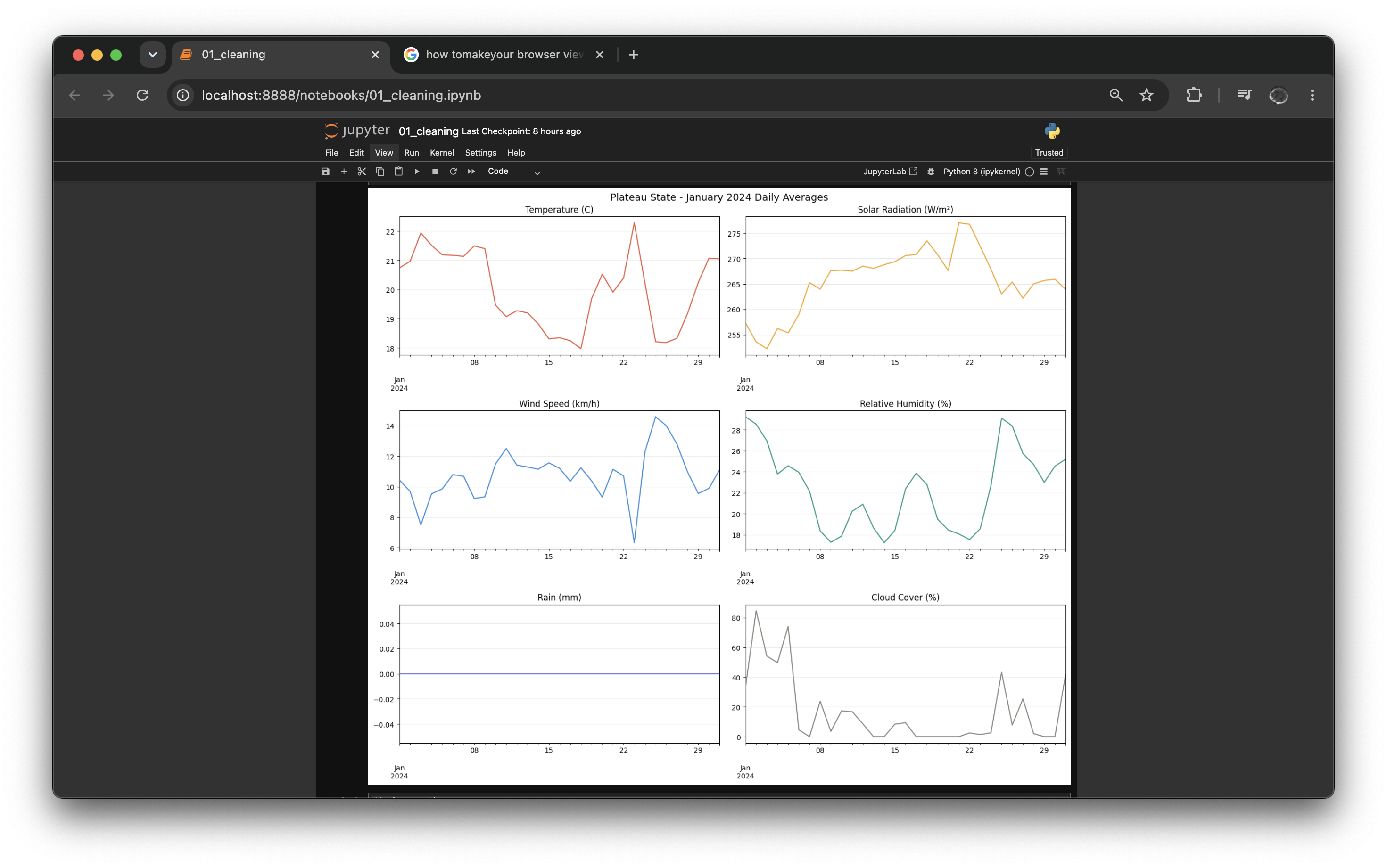
These plots revealed how weather conditions changed throughout January. reducing the stress of going through the many records of hourly records
Solar Radiation Heatmap
One visualization I particularly enjoyed building was a heatmap.
pivot = df_heat.pivot_table(
    values="shortwave_radiation",
    index="hour",
    columns="day",
    aggfunc="mean"
)
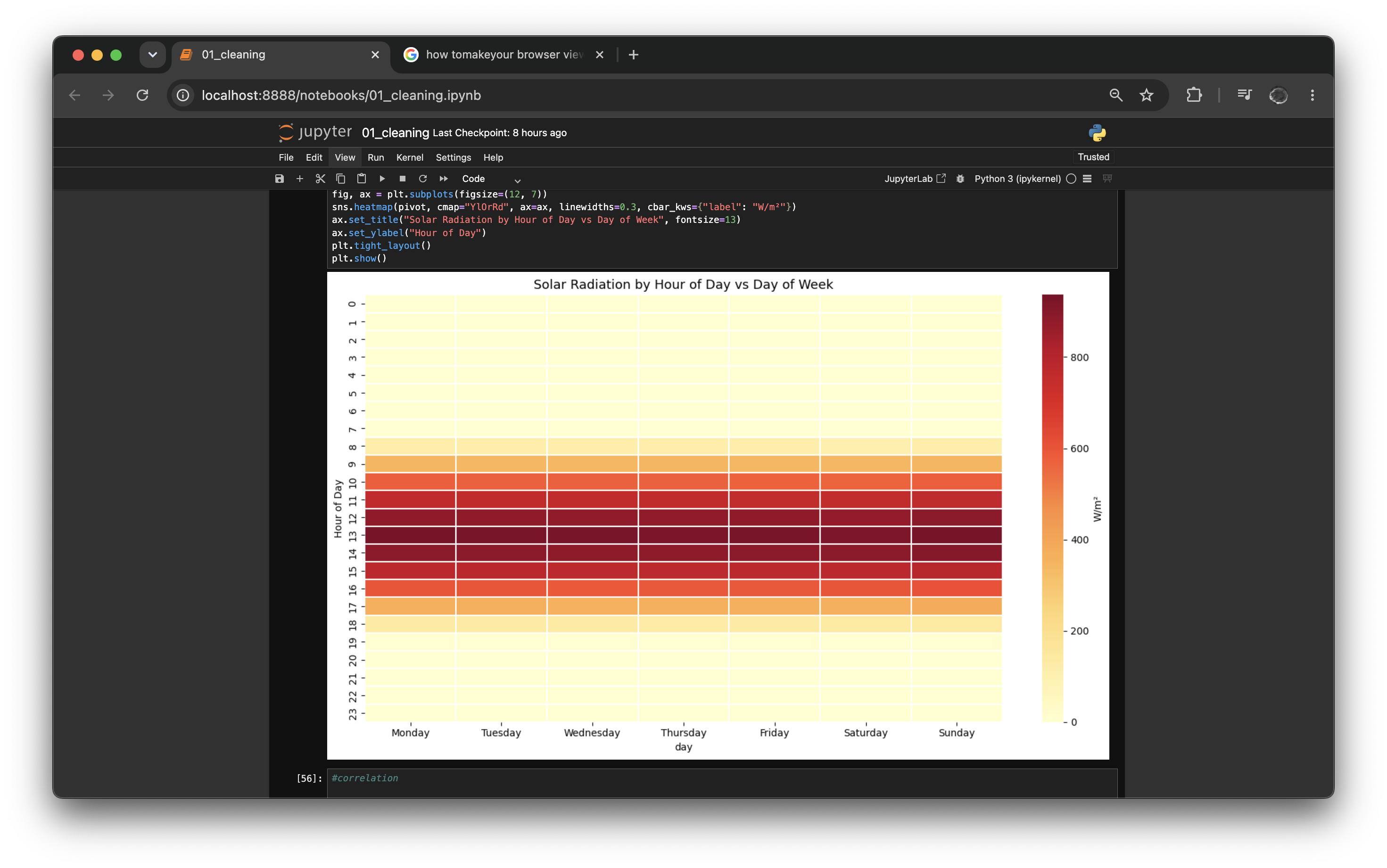
Rather than answering "How much solar radiation did we record?", this chart answers:
What hour receives the most sunlight?
Does Monday differ from Saturday?
When does solar production begin to rise?
Correlation Analysis
A features correlation matrix was generated.
sensor_cols = [
    "temperature_2m",
    "shortwave_radiation",
    "windspeed_10m",
    "relative_humidity_2m",
    "rain",
    "cloud_cover"
]

df[sensor_cols].corr()
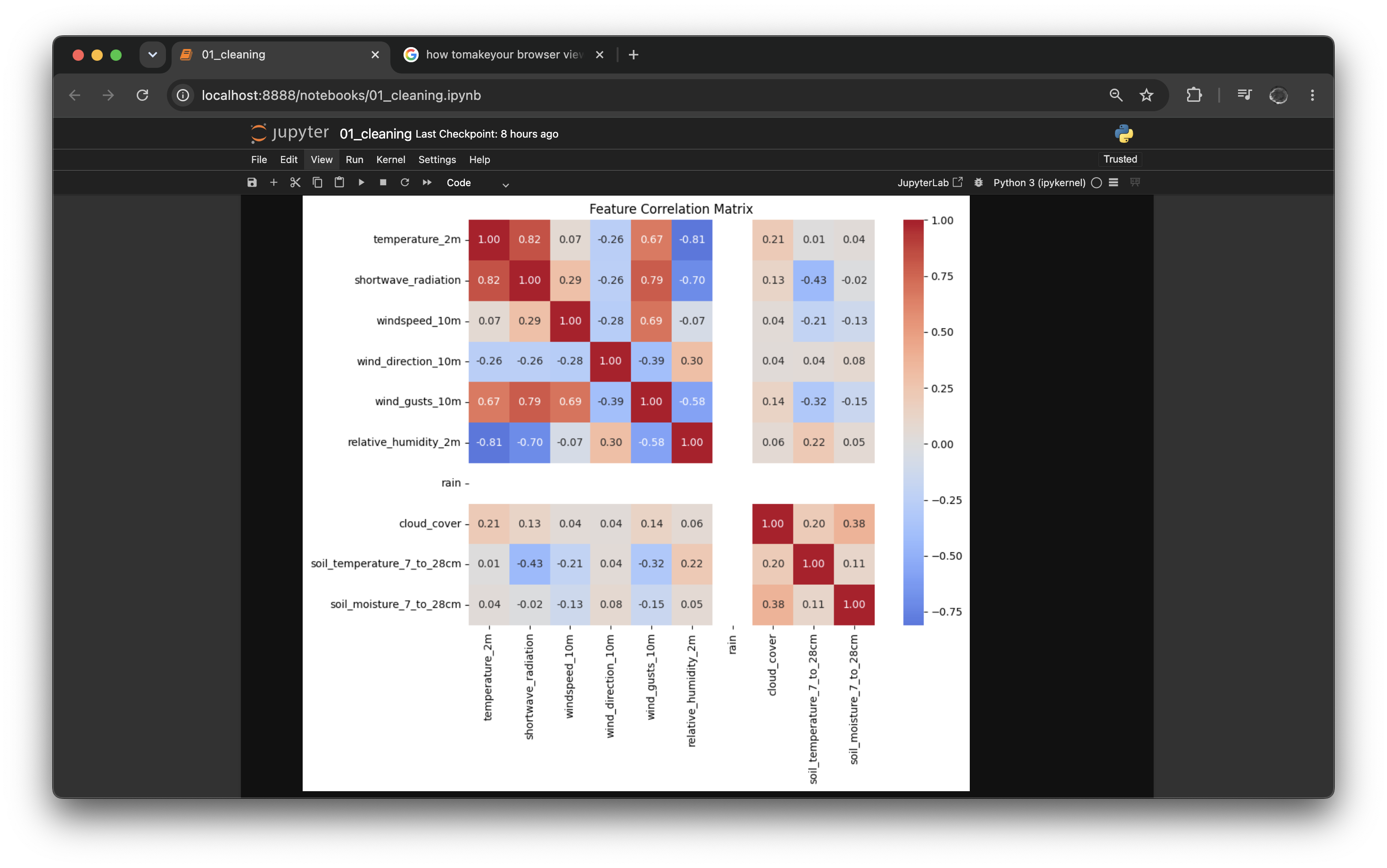
Correlation doesn't imply causation, but it provides a useful first look at how environmental variables move together.
Day 5 — Feature Engineering
If Day 4 was about understanding the data, Day 5 was about helping the machine understand it.
Raw timestamps aren't very meaningful to a machine learning model.
So it was extracted fo get more useful information.
Time Features
df["hour"] = df.index.hour
df["day_of_week"] = df.index.dayofweek
df["month"] = df.index.month
df["is_weekend"] = (df.index.dayofweek >= 5).astype(int)
These simple additions allow the model to recognize recurring patterns throughout the day and week.
Cyclical Encoding
One intresting technique was encoding the ttime using sine and cosine functions.
df["hour_sin"] = np.sin(2 * np.pi * df["hour"] / 24)
df["hour_cos"] = np.cos(2 * np.pi * df["hour"] / 24)
Why?
Because mathematically, hour 23 is much closer to hour 0 than it is to hour 12.
Using sine and cosine preserves this circular relationship, making it much easier for the model to learn daily cycles.
Lag Features
Weather depends heavily on what happened recently.
Instead of giving the model only the current temperature, previous observation snaptshot was included.
df["temperature_2m_lag24"] = df["temperature_2m"].shift(24)
The same process was repeated for:
solar radiation
wind speed &
humidity
This allows the model to learn temporal dependencies rather than treating every observation independently.
Rolling Statistics
To capture short-term trends, rolling averages were generated.
df["temperature_2m_rolling24h"] = (
    df["temperature_2m"]
      .rolling(24)
      .mean()
)
Rolling statistics help smooth noisy sensor readings and often improve forecasting performance.
Day 6 — Preparing the Data for Modelling
With the features complete, the final task was preparing the dataset for machine learning.
Many algorithms assume numerical variables have similar scales.
For example:
Temperature → 20°C
Solar Radiation → 900 W/m²
Without scaling, larger values can dominate the optimisation process.
To prevent this, Scikit-Learn's StandardScaler was used.
from sklearn.preprocessing import StandardScaler

scaler = StandardScaler()
scaler.fit(df_train[cols_to_scale])
One important lesson to note is that the scaler is fitted only on the training dataset.
The test dataset is transformed using the already-fitted scaler.
This prevents data leakage, one of the easiest mistakes to make in machine learning.
Saving Artifacts
The final step wasn't training a model.
It was saving everything needed for future modelling.
joblib.dump(scaler, "models/scaler.joblib")

df_train_scaled.to_parquet("data/splits/train.parquet")
df_test_scaled.to_parquet("data/splits/test.parquet")
At the end of Day 6, the project now contains:
a cleaned dataset,
engineered features,
standardized numerical variables,
reusable train/test splits,
and a serialized scaler ready for deployment.
The notebook outputs arent temporary, they're reusable for the modelling pipeline to consume over the coming days.
Moving The Models....
The next phase is where machine learning finally begins.
With the data pipeline complete and the features engineered, I'll start training baseline models, comparing performance, and gradually moving toward more advanced algorithms.
see ya!!


